> For the complete documentation index, see [llms.txt](https://docs.jakarto.com/guide-jakartowns/llms.txt). Markdown versions of documentation pages are available by appending `.md` to page URLs; this page is available as [Markdown](https://docs.jakarto.com/guide-jakartowns/en/getting-started-with-jakartowns/reglages.md).
# Changing Settings
'Configuration and settings' button
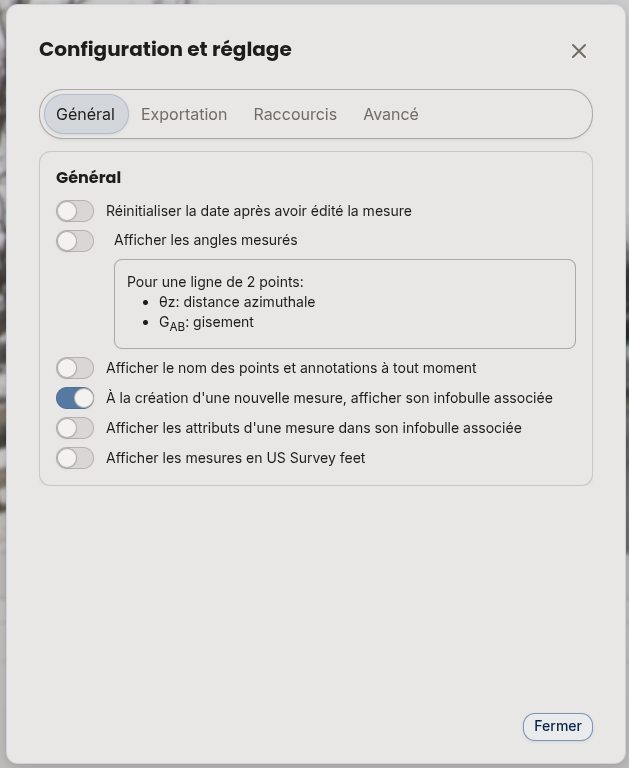
The **Configuration and settings** button, accessible from the application header, opens the **Configuration and settings** panel. Its **General** tab groups together the options that adapt Jakartowns' display and behavior to your work habits, independently of the current inventory.
## Units of Measurement
By default, Jakartowns displays distance measurements in metric units. You can switch the display to **US Survey feet** via the **Use U.S. Survey Feet instead of meters** option.
## Displaying Measured Angles
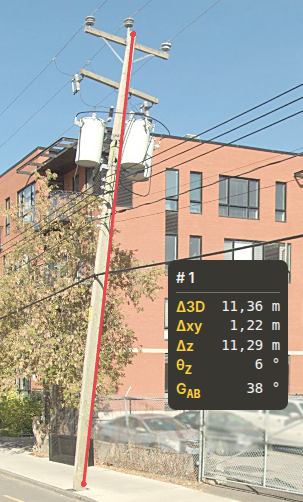
Enabling the **Display measured angles** option makes every distance measurement between two points also show two complementary angles:
* the **zenith distance** (also called co-altitude): the angle relative to the zenith;
* the **bearing**: the angle relative to the Y axis of the projection system used. The bearing generally corresponds to the angle relative to geographic north, but this can vary depending on the projection system used.
Tilted pole (zenith distance of 6°)
## Displaying Measurement Tooltips
Several options let you adjust what is automatically displayed on hover or when a measurement is created:
* **Display names of points and annotations at all time**: shows tooltips even without selecting the entity.
* **When creating a new measure, display its associated tooltip**.
* **Display the measure's attributes in its associated tooltip**, with the additional option to also display the name of each attribute.
* **Reset the date after editing a measure**.
Configuration layout
## Advanced Configuration
Other configuration options are available in the **Advanced** tab of the **Configuration and settings** panel. These options let you adjust Jakartowns' behavior for specific use cases.